Android 17 Advanced Protection Blocks Unverified Apps From Accessibility Services
Android 17 Advanced Protection restricts AccessibilityService access to verified accessibility tools, helping block banking malware, spyware and financial fraud while adding USB, WebGPU and intrusion-logging defenses.
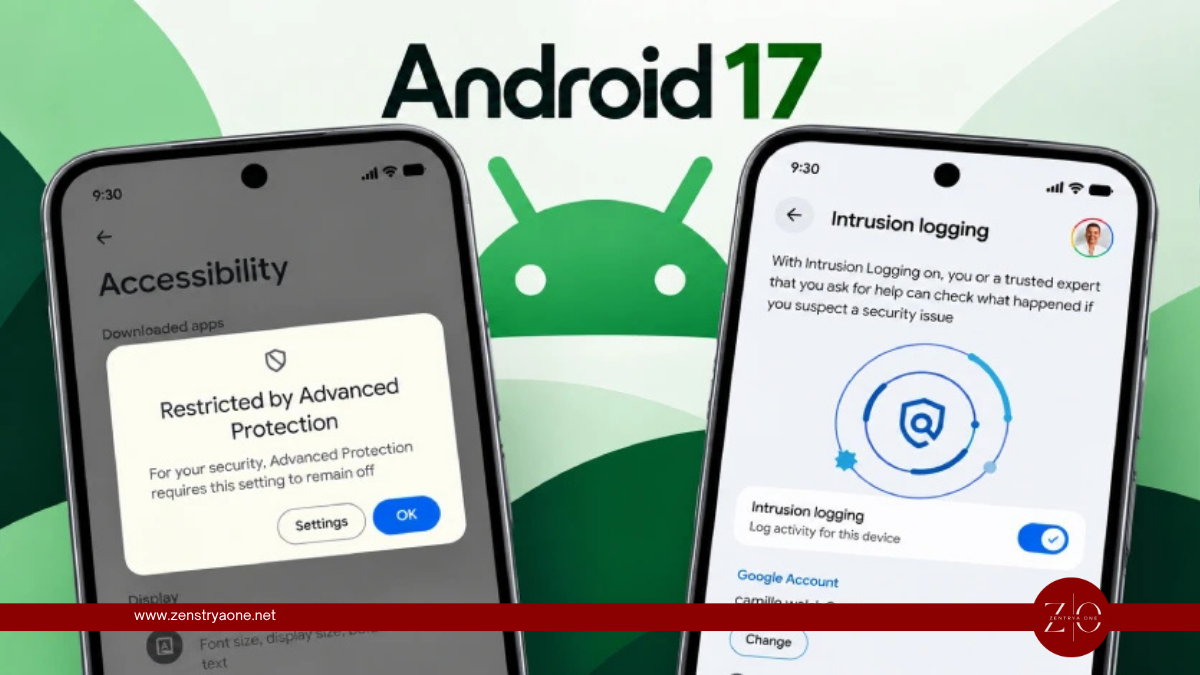
Google is strengthening Android 17 Advanced Protection by preventing unverified applications from accessing Android's powerful AccessibilityService API, a feature frequently abused by banking malware, spyware and financial-fraud applications.
When Advanced Protection is enabled, accessibility service access is automatically limited to verified applications categorized as Accessibility Tools, such as legitimate screen readers and assistive technologies.
Why Accessibility Services Are a Major Target
Android's AccessibilityService API is designed to help people with disabilities interact with applications and device interfaces.
However, the same capabilities can be abused by malware to:
- Read sensitive information displayed on screen
- Capture user interactions and keystrokes
- Display fake login screens
- Grant additional permissions
- Initiate fraudulent banking transactions
- Prevent victims from uninstalling malicious applications
Attackers commonly use social engineering to convince victims to manually grant these permissions to malicious applications.
The typical attack chain looks like:
Malicious App → Victim Grants Accessibility Permission → Malware Controls UI → Credentials/Data Stolen → Fraudulent Actions
Android 17 Advanced Protection is designed to break this chain by restricting AccessibilityService access to verified accessibility applications.
Six Advanced Protection Improvements
Google has highlighted six major security capabilities associated with Advanced Protection:
| Feature | Security Benefit |
|---|---|
| Accessibility Protection | Restricts accessibility services to verified tools |
| Intrusion Logging | Creates protected forensic logs for investigations |
| USB Protection | Blocks new USB data connections while locked |
| Disable WebGPU | Reduces browser attack surface |
| Failed Authentication Lock | Locks the device after repeated authentication failures |
| View Supporting Apps | Shows apps interacting with Advanced Protection |
Most features are available on Android 17 devices, while USB Protection and Failed Authentication Lock availability depends on device support.
Intrusion Logging Helps Investigate Spyware
Another important feature is Intrusion Logging, designed to assist investigations when sophisticated spyware or targeted compromise is suspected.
Security and network events are end-to-end encrypted and securely backed up to the cloud. Google says logs are retained on a rolling 12-month basis before being automatically deleted.
Unlike several other Advanced Protection features, Intrusion Logging requires the user to manually opt in.
USB Connections Are Also Restricted
On supported devices, USB Protection prevents new USB data connections while the phone is locked.
Newly connected USB devices default to charging-only functionality until the user unlocks the phone. Connections established while the device was already unlocked can continue after the screen locks.
This provides additional protection against malicious accessories, unauthorized physical access and certain device-forensics techniques.
WebGPU Disabled to Reduce Browser Attack Surface
Android 17 Advanced Protection also disables WebGPU in Chrome.
WebGPU provides websites with access to high-performance graphics capabilities, but its complexity can increase browser attack surface. Google says disabling it provides an additional defensive layer against sophisticated browser exploitation.
Designed for High-Risk Users — But Available More Broadly
Advanced Protection is particularly useful for people at greater risk of sophisticated attacks, including journalists, public figures and other high-risk users, but Android users can enable the device protection setting themselves.
It acts as a central security switch that enables multiple defenses and prevents individual protections from being accidentally or maliciously disabled.
Users can enable it through:
Settings → Security & Privacy → Advanced Protection → Device protection
Some protections may require the device to restart.
Security Takeaway
Android malware has repeatedly abused accessibility permissions because they provide powerful control over the device without requiring root access.
Android 17's new restriction directly targets that attack path:
Unverified App → Accessibility Request → Advanced Protection → Access Blocked
Combined with USB protection, intrusion logging, browser hardening and authentication protections, Android 17 Advanced Protection provides a stronger defense-in-depth security model for users facing sophisticated mobile threats.
Related reporting

MI5 Says China’s MSS Funded Research Involving More Than 100 U.K.-Linked Academics
MI5 says China's Ministry of State Security used CGTRI-linked funding for research involving more than 100 U.K.-linked academics in AI, cybersecurity and other technologies with potential espionage applications.

Attacker Hijacks AI Coding Assistant Session and Spreads Shai-Hulud Across 100 Repositories
An attacker hijacked an AI coding-assistant session at a SaaS provider, stole GitHub OAuth tokens and spread the Shai-Hulud worm across about 100 internal code repositories.

N0va Phishkit Targets US and European Businesses With Device-Code Authentication Attacks
N0va phishing attacks target US and European organizations by abusing Microsoft device-code authentication to obtain access and refresh tokens, potentially enabling SSO account takeover even after MFA.