Windows 11 Security Update KB5124008 Breaks Always On VPN Connections
Microsoft’s September 2026 security update for Windows 11 is causing connectivity problems for organizations using Always On VPN, with reports indicating that certificate-based VPN configurations can stop connecting after the update is installed.

The issue is particularly significant for enterprise environments that depend on Always On VPN to provide persistent, policy-controlled access to corporate resources for remote Windows devices. Administrators have reported that affected tunnels work normally before KB5124008 is installed but fail immediately afterward. Removing the update and rebooting the affected endpoint restores VPN connectivity in reported cases.
What Is KB5124008?
KB5124008 is Microsoft's September 8, 2026 cumulative security update for Windows 11 versions 24H2 and 25H2.
The update moves Windows 11 24H2 systems to build 26100.9445 and Windows 11 25H2 systems to build 26200.9445. It is part of the September 2026 Patch Tuesday release and contains a substantial collection of security fixes, making an immediate rollback a difficult decision for organizations that have strict patching requirements.
| Component | Details |
|---|---|
| Update | KB5124008 |
| Release date | September 8, 2026 |
| Windows 11 versions | 24H2 and 25H2 |
| 24H2 build | 26100.9445 |
| 25H2 build | 26200.9445 |
| Reported impact | Always On VPN connectivity |
| Most affected configuration | Certificate-based authentication |
| Enterprise components commonly involved | RRAS, NPS, Intune-managed VPN profiles |
Always On VPN Connections Fail After the Update
Reports from Windows administrators indicate that Always On VPN connections configured with certificate-based authentication can fail after KB5124008 is installed.
One reported enterprise environment uses Windows 11 24H2/25H2 clients, certificate-based authentication, Windows Server 2019 RRAS/NPS infrastructure and VPN profiles deployed through Microsoft Intune. According to the report, the VPN worked before installing KB5124008, stopped functioning after installation and immediately began working again after the update was removed and the endpoint rebooted.
Another administrator reported that affected users were unable to establish the Always On VPN connection and that the connection remained stuck while attempting to connect. Removing KB5124008 restored connectivity.
The reports indicate that this is not simply an isolated endpoint configuration problem. Multiple administrators have described similar behavior across several machines.
Certificate-Based Authentication Appears to Be the Key Factor
The reported failures are concentrated around Always On VPN deployments that use certificate-based authentication.
Always On VPN can use certificates as part of the authentication process between Windows clients and the organization's VPN infrastructure. In enterprise deployments, this can involve:
- Device or user certificates
- EAP-TLS authentication
- Remote Authentication Dial-In User Service (RADIUS)
- Network Policy Server (NPS)
- Routing and Remote Access Service (RRAS)
- Intune-delivered VPN configuration profiles
When the authentication or negotiation process fails, the endpoint may be unable to establish the secure tunnel even though the VPN configuration itself has not changed.
At present, the available reports establish a strong correlation between KB5124008 and the failure, but they do not establish a definitive root cause inside Microsoft's networking or certificate-processing components. Administrators should therefore avoid assuming that changing certificate templates or VPN profiles will necessarily resolve the issue.
How the Regression Can Affect Organizations
The impact can be substantial for companies that rely on Always On VPN as their primary remote-access mechanism.
Affected employees may experience:
- Always On VPN failing to connect
- VPN connections becoming stuck during connection establishment
- Loss of access to internal applications and file shares
- Inability to reach domain or corporate resources remotely
- Authentication failures during VPN negotiation
- Increased help-desk and IT support workload
- Disruption to remote-work operations
For organizations using Always On VPN as a security control rather than merely a convenience feature, the problem can also interfere with established network-access policies.
Reported Recovery Process
The most consistently reported recovery procedure is:
- Confirm that the endpoint received KB5124008.
- Verify that Always On VPN worked before the update.
- Check VPN and authentication logs.
- Uninstall KB5124008 from an affected test endpoint.
- Reboot the device.
- Test the Always On VPN connection again.
Administrators reporting this sequence have observed that the VPN connection returns after the update is removed and the machine restarted.
However, removing a security update should not be treated as a permanent enterprise-wide solution without a formal risk assessment.
Troubleshooting and Detection
Organizations experiencing the problem should collect evidence before making widespread configuration changes.
Windows administrators should review:
| Log / Component | What to Check |
|---|---|
| RasClient | VPN connection and authentication failures |
| NPS logs | RADIUS authentication and policy failures |
| Event Viewer | Errors generated immediately before and after connection attempts |
| VPN profile | Authentication and certificate configuration |
| Certificate stores | Client certificate availability and validity |
| Intune | VPN profile deployment and configuration state |
| RRAS | Connection and authentication events |
The Windows RasClient event logs are particularly useful for determining where the connection process is failing. Microsoft community reports specifically recommend reviewing RasClient and NPS logs when investigating this regression.
Enterprise Patch Management Considerations
The situation creates a difficult balance for security teams.
KB5124008 is a security update and should not be casually removed from an entire Windows fleet. At the same time, deploying a problematic update to every Always On VPN endpoint can potentially disconnect remote employees from corporate infrastructure.
A safer approach is to use a controlled deployment strategy:
Identify affected devices → isolate an Always On VPN pilot group → reproduce the failure → collect logs → pause deployment for affected cohorts → monitor Microsoft's response → deploy the corrected update when available.
Organizations using WSUS, Microsoft Intune or other enterprise patch-management platforms can use deployment rings to separate Always On VPN-dependent systems from other Windows endpoints.
Should Organizations Remove KB5124008?
There is no universal answer.
If an organization does not use Always On VPN, this particular regression may have little or no operational impact.
For organizations heavily dependent on certificate-based Always On VPN, however, temporarily holding KB5124008 on affected client groups may be preferable to losing remote connectivity.
The important distinction is that the update should not simply be blocked indefinitely. KB5124008 contains security fixes, so organizations should continue monitoring Microsoft for a replacement cumulative update or documented remediation.
A temporary rollback should therefore be accompanied by:
- Increased endpoint monitoring
- Restricted exposure for affected systems
- Continued patching of VPN infrastructure
- Microsoft support escalation
- Tracking of the affected KB and replacement update
- A documented exception and risk acceptance process
Microsoft's official release information confirms KB5124008 as the September 2026 cumulative update for Windows 11 24H2 and 25H2.
Security Teams Should Avoid Unnecessary VPN Configuration Changes
Because the failure appeared immediately after the Windows update in reported environments, administrators should first establish whether KB5124008 is responsible before modifying certificate authorities, NPS policies, RRAS settings or Intune VPN profiles.
Changing multiple components simultaneously can make the underlying problem more difficult to identify.
A controlled A/B test is preferable:
Patched endpoint: KB5124008 installed → VPN fails
Unpatched endpoint: KB5124008 absent → VPN works
Rollback test: KB5124008 removed → VPN works again
If this pattern can be reproduced consistently, the evidence strongly supports an update-related regression rather than a sudden certificate expiration or unrelated infrastructure failure.
Current Status
As of September 11, 2026, reports indicate that the Always On VPN problem is affecting enterprise environments using certificate-based authentication, while administrators are seeking an official Microsoft fix. Microsoft has not yet publicly documented a definitive root cause for this particular regression in the sources reviewed for this report.
For organizations operating Always On VPN, the immediate priority should be controlled testing rather than indiscriminate removal or deployment of the update.
The incident also highlights a recurring challenge in enterprise patch management: security updates must be deployed quickly, but even a legitimate security patch can introduce regressions into critical authentication and network-access infrastructure. For remote workers whose devices depend on Always On VPN, a VPN failure can effectively become an availability incident across the organization.
Related reporting

KREMLIN Banking Malware Hijacks Chrome and Edge to Steal Credentials and Session Tokens
Cybersecurity researchers have uncovered a sophisticated banking-malware campaign that hijacks Google Chrome and Microsoft Edge using malicious browser extensions capable of stealing credentials, cookies, session tokens and other sensitive browser data.

UK Government Begins Moving 23 Million Users Away From Passwords With Passkeys
The UK government has begun rolling out passkey authentication to more than 23 million GOV.UK One Login users, marking a major move away from traditional password-based authentication for accessing public services.
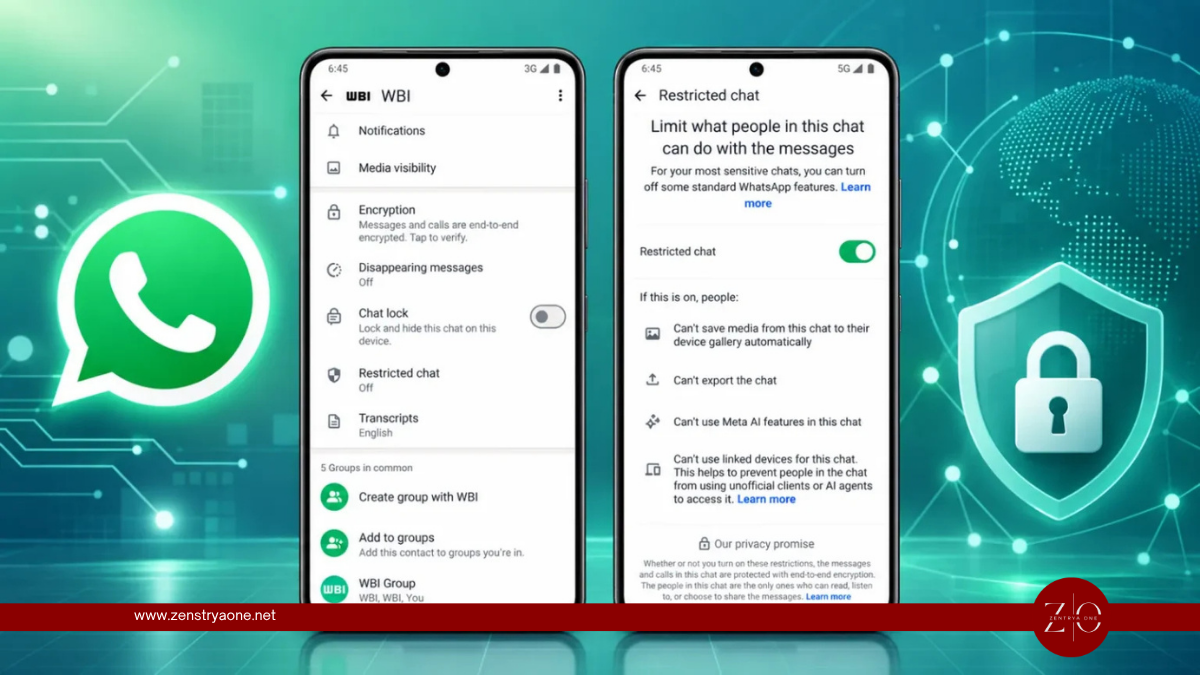
WhatsApp Tests Restricted Chat Feature to Keep Sensitive Conversations on Your Primary Phone
WhatsApp is developing a new privacy feature called Restricted Chat that could give users greater control over where sensitive conversations are accessible.